/request create design-critiques
Approvals shouldn’t live in DMs.
Channel changes by DM are how workspaces get accidentally reorganized. Just Request turns them into tickets an approver clicks — and the record keeps itself.
 Just RequestAPP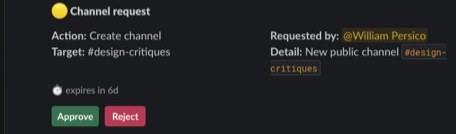
How it works
Request, approve, done
Request the action
/request create design-critiques
Type /request with a create, rename, topic, or archive action — or bare /request to open the form and add purpose and visibility.
An approver clicks
The ticket lands in the channel with Approve and Reject buttons and a one-click confirm. No DM chase-downs, no “you saw this, right?”
The bot runs it — on the record
Approved actions execute once; rejected ones don’t run at all. Either way the ticket keeps who decided what, and when.
Features
The product, not a mockup
Every image below is Just Request running in a real Slack workspace — captured, not composed.
Create
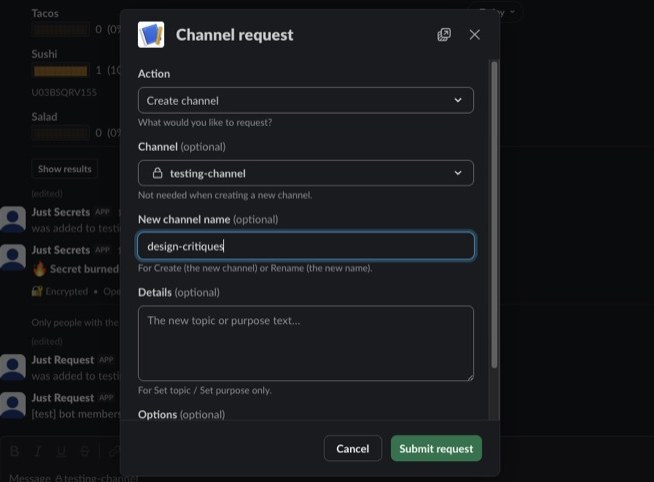
The form that asks the right questions
Action, target channel, name, purpose — the request arrives complete, so approvers decide instead of interrogating. Private or public, chosen up front.
Every risky action
Create, rename, topic, archive — the four ways a channel gets broken, each one gated behind a human yes.
Audit trail
Every ticket keeps its requester, approver, timestamps, and outcome. The archive answers “who renamed this?” for good.
Safe by construction
Duplicate approvals dedupe. Already-archived or missing channels are handled gracefully. Bot-token only — no admin scopes, ever.
Free. Unlimited. Self-hosted.
FreeEvery action. No per-seat pricing.
UnlimitedRequests, approvals, and audit history.
Self-hostedThe workflow lives on your server.
FAQ
Asked and answered
Who approves a request?
Whoever you designate. Requests land as ticket cards in a channel; anyone you trust with the Approve button can act on them.
What actions can be requested?
Create, rename, set topic, and archive — the four channel operations most likely to go wrong on a Friday afternoon.
What happens if two people approve at once?
Approvals are idempotent. The first click runs the action; the second is recognized as a duplicate and does nothing twice.
Does the app need admin scopes?
No. Just Request runs on bot-token scopes only and never requests the enterprise-only admin scopes some tools ask for.
How do I install?
Click "Add to Slack", review and grant the requested scopes, then invite the bot to the channels where you want requests with /invite @Just Request.
Is it really free?
Yes — unlimited requests, every action, no per-seat pricing. Self-hosted, so there’s nothing to meter.